Windows guide
Install GreenTunnel VPN on Windows
Six steps, about two minutes. This page shows every screen you will see, including the Windows SmartScreen warning, and explains why it appears.
Version 0.1.1 · Windows 10 (version 1809 or newer) or Windows 11, 64-bit · about 100 MB
Step by step
-
Choose the right file
Most PCs use an Intel or AMD processor and need the x64 file. Laptops with a Qualcomm Snapdragon processor need the ARM64 file.
Not sure? Open Settings → System → About and look at System type. “x64-based processor” means x64. “ARM-based processor” means ARM64.
-
Download the file
Click the download button above. Your browser may warn that the file “isn't commonly downloaded”. That only means few people have downloaded this exact file so far.
In Microsoft Edge: open the downloads panel, click ··· next to the file, choose Keep, then Show more → Keep anyway. In Google Chrome: click Keep in the download bubble.
Microsoft Edge: click ··· and choose Keep. -
Open the installer
Open your Downloads folder and double-click
GreenTunnelVPN-0.1.1-x64.msi(or the ARM64 file). -
Allow it in SmartScreen
Windows may show a red window (blue on older versions) titled Windows protected your PC. The app hasn't been blocked for anything it did; Windows simply doesn't know it yet (see why below).
- Click More info.
- Check that the app name is
GreenTunnelVPN-0.1.1-x64.msi, the file you just downloaded from greentunnelvpn.com. - Click Run anyway.
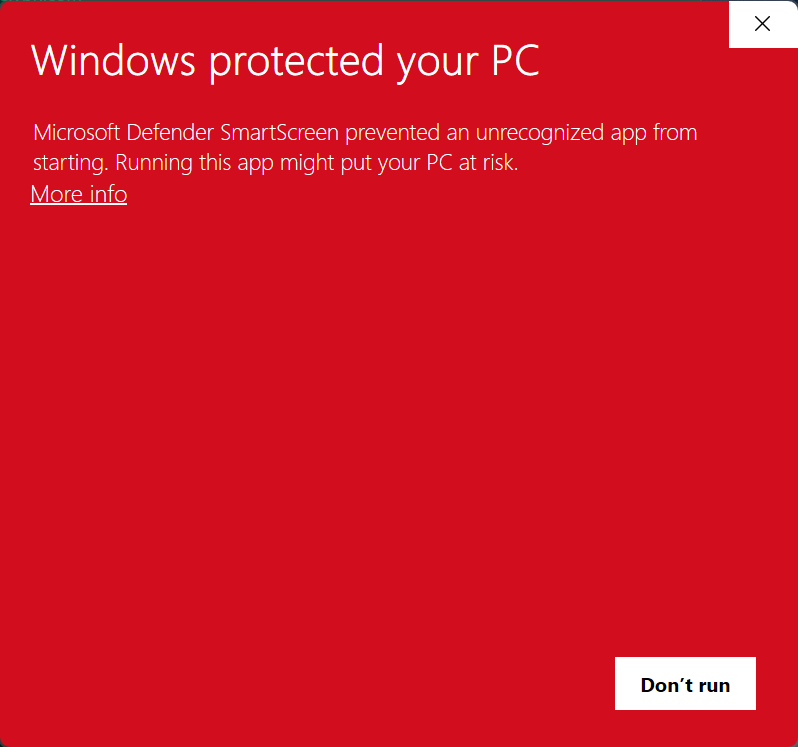
1. Click More info. 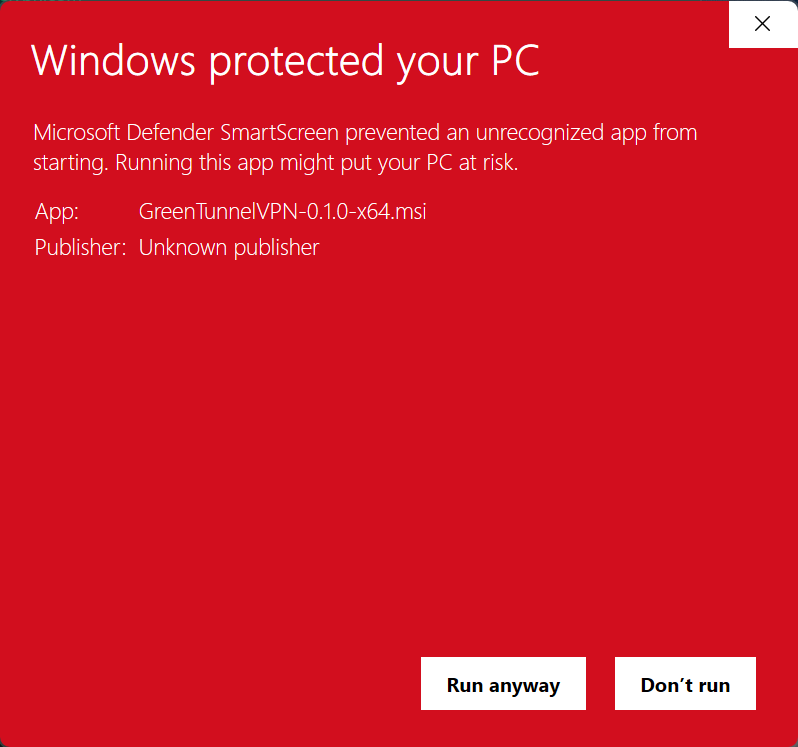
2. Check the name, then click Run anyway. -
Install
The setup window opens. Click Next, tick I accept the terms in the License Agreement and click Next.
On the Shortcuts page, choose whether to add GreenTunnel VPN to the desktop and to the Start menu (both are ticked), then click Next and Install.
Windows then asks whether to allow the app to make changes to your device. Click Yes. Administrator rights are needed once, to install the background service and the GreenTunnel network adapter. When setup is done, leave Open GreenTunnel VPN ticked and click Finish.
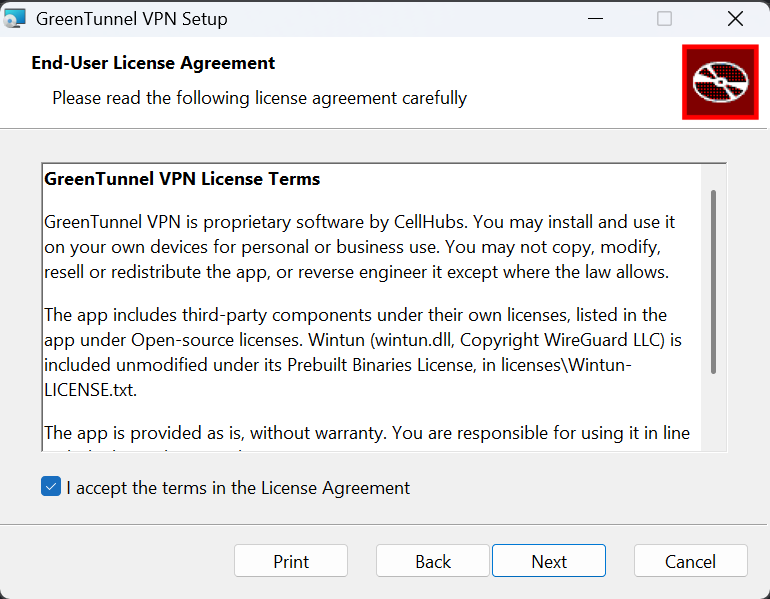
Accept the license and click Next. 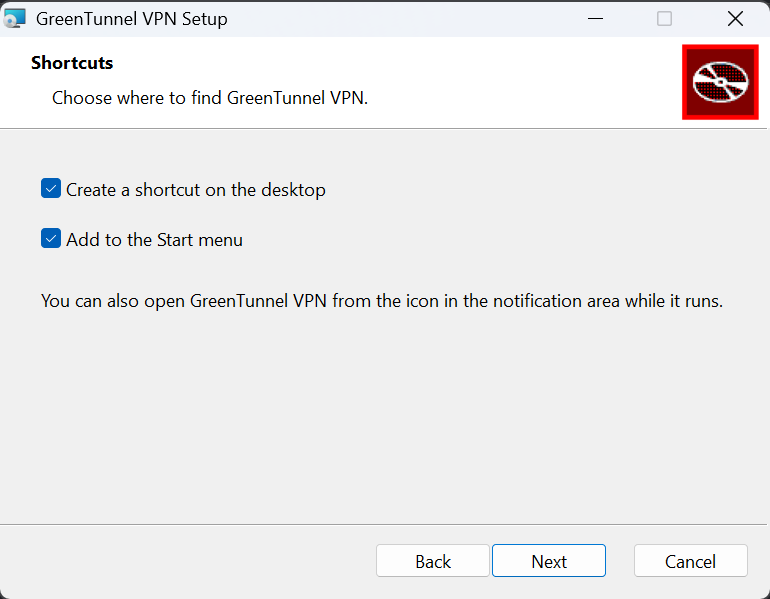
Choose your shortcuts. Click Yes to allow the installation. 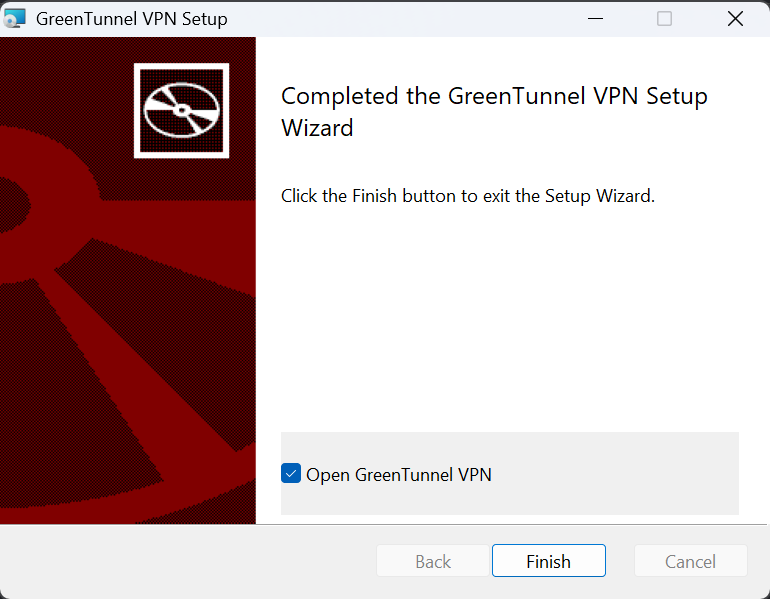
Click Finish to open the app. -
Turn on protection
Open GreenTunnel VPN from the Start menu and click Turn on. Every app on the PC now goes through GreenTunnel: encrypted DNS, DPI bypass and the block lists you choose.
Optional: in Settings, turn on Turn on protection at startup and Open at login.
Why does Windows show this warning?
SmartScreen judges files by reputation, not by what they contain. Microsoft Defender SmartScreen checks every app downloaded from the internet against a list of apps that many people already run. A new file that few people have downloaded yet gets the “unrecognized app” warning, whatever it does. It doesn't mean a virus was found: when Microsoft Defender finds malware, it removes the file and shows a separate “Threats found” notification.
Why GreenTunnel shows it now. Version 0.1.1 is our first Windows release, so it has very few downloads. It is also not yet signed with a code-signing certificate, which is why the publisher shows as “Unknown publisher”. We are getting a certificate. Once the installer is signed with the CellHubs name and more people install it, the warning appears less and then disappears.
How to be sure the file is genuine.
- Only download it from this page.
- Open PowerShell in your Downloads folder and run
Get-FileHash .\GreenTunnelVPN-0.1.1-x64.msi. - Compare the result with the fingerprint in SHA256SUMS.txt. They must match exactly.
What GreenTunnel installs. The app, a Windows service named GreenTunnel VPN Service that runs the engine, and a network adapter named GreenTunnel (Wintun) that is only active while protection is on. GreenTunnel is a local VPN: your browsing never passes through our servers, and it doesn't hide your IP address.
If something gets in the way
- There is no “Run anyway” button
- On Windows 11, Smart App Control blocks apps that aren't signed, and it offers no way past the warning. On many PCs, turning it off can't be undone without reinstalling Windows, so we don't suggest it. Please wait for the signed version, or install GreenTunnel on another PC. You can check the setting in Windows Security → App & browser control → Smart App Control.
- “This app has been blocked by your system administrator”
- Your PC is managed by a company or school that only allows approved apps. Ask your IT department.
- My antivirus removed the file
- Some antivirus programs distrust new, unsigned files. Check the file's fingerprint as shown above, then restore it from quarantine or add an exception. Please tell us which antivirus it was at cellhubsapp@gmail.com.
- Websites don't load after turning it on
- Turn off any other VPN app first: two VPNs routing all traffic will conflict. Then click Turn off and Turn on again in GreenTunnel.
Updating and uninstalling
- Updates: the app checks for a new version when it opens and every 12 hours, and asks before installing it. You can also download the new installer from this page and run it over the old version; your settings are kept.
- Uninstall: open Settings → Apps → Installed apps, find GreenTunnel VPN, click ··· and choose Uninstall. The service and the network adapter are removed too.
Other devices: all downloads. Questions: cellhubsapp@gmail.com.