IPv6 and VPNs: how IPv6 can leak around a VPN
What IPv6 is, why a VPN that only handles IPv4 can leak, how GreenTunnel handles IPv6 as you switch networks, and how to check your own connection.

VPN guides love to talk about DNS leaks and kill switches, but IPv6 rarely gets a mention. Yet it is one of the most common leaks: the VPN believes it covers everything while a big share of traffic quietly takes another road. This post explains what IPv6 is, why it matters for VPNs, how GreenTunnel handles it, and how to check your own connection.
What is IPv6?
Every device on the Internet needs an address. The old standard, IPv4, uses 32-bit addresses written like 203.0.113.10. There are about 4 billion of them, and they ran out long ago. ISPs have to put many customers behind one shared address using NAT.
IPv6 uses 128-bit addresses written in hexadecimal with colons, for example 2001:db8::1. There are so many that every device can have its own. Many ISPs now hand out both kinds at once, which is called dual-stack.
When a site has both kinds of address, browsers and apps usually try IPv6 first and fall back to IPv4 if IPv6 is slow or fails. This is known as Happy Eyeballs. So on a network with IPv6, a large part of your traffic may be using IPv6 without you knowing.
Why IPv6 matters for VPNs
A VPN on a phone works by telling the operating system "send traffic to me". It has to say so separately for IPv4 and for IPv6. If it only claims IPv4, every IPv6 connection still goes straight out to the real network, as if the VPN weren't there.

What that means depends on the kind of VPN:
- A remote VPN promises to change your IP. An IPv6 leak means sites still see your real IPv6 address.
- A local VPN like GreenTunnel doesn't change your IP when going direct, but it still has to see every connection to apply encrypted DNS, DPI bypass, your block list and routing rules. An IPv6 connection that goes around it isn't bypassed, isn't caught by the block list and doesn't show up in Requester.
- With a proxy or tunnel, an IPv6 leak means some traffic doesn't go through the server you chose. That is exactly what no leaks when a proxy fails is about.
The opposite mistake causes trouble too. If a VPN claims IPv6 on a network that doesn't have it, apps try IPv6 first, the VPN can't send it anywhere, and you see slow loads or connection errors instead of an instant fallback to IPv4.
How GreenTunnel handles IPv6
It takes IPv6 only when the real network has it
Each time it starts, GreenTunnel on Android and iOS checks the network you're on. On Android, the network must have a global IPv6 address and an IPv6 default route. On iOS, the system must report that the network supports IPv6.
- Network with IPv6: GreenTunnel takes all IPv6 traffic, along with all IPv4 traffic. Nothing goes around it.
- IPv4-only network: GreenTunnel doesn't claim IPv6. Apps see that the device has no IPv6 and use IPv4 straight away, with no failed attempts first.
It follows you when the network changes
You leave home and your phone switches from Wi-Fi to mobile data. The new network may have IPv6 when the old one didn't, or the other way round. GreenTunnel watches the active network. When IPv6 appears or disappears, it rebuilds the tunnel on Android, or reapplies its network settings on iOS, to match the new network. You don't need to turn it off and on.
Proxy Route and Tunnel Link
- Proxy Route: when the site name is known, GreenTunnel hands the domain to the proxy and lets the proxy resolve it. The proxy then uses IPv4 or IPv6 depending on its own network. If the proxy can't carry UDP, GreenTunnel blocks all UDP except DNS, so apps switch to TCP and go through the proxy. See Proxy Route.
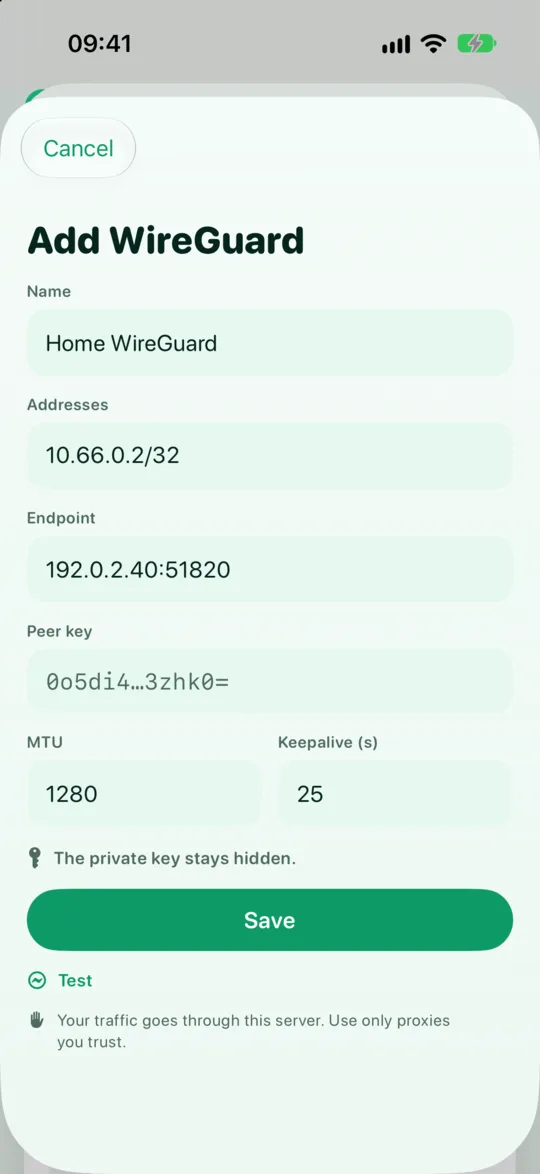
- Tunnel Link (WireGuard): a WireGuard profile has an Addresses field, for example
10.8.0.2/32andfd00::2/128. If it includes an IPv6 address, IPv6 connections go through the tunnel. If it only has IPv4, IPv6 connections routed to that tunnel are rejected at once instead of slipping out directly. Most apps then retry over IPv4. See Tunnel Link.
How to check your connection
- Does your network have IPv6? Turn GreenTunnel off and open an IPv6 test site such as
test-ipv6.com. It tells you whether you have IPv4, IPv6 or both. - Turn GreenTunnel on and test again. In direct mode the result should match, because GreenTunnel doesn't change your IP. What matters is that IPv6 still works if your network has it.
- Look in Requester. Open Requester and tap a connection. The Address line shows IPv6 in brackets, for example
[2001:db8::1]:443. An IPv6 connection listed there went through GreenTunnel. - With a proxy or tunnel: check an IP test site again. The address shown should belong to the server you chose, for IPv4 and for IPv6 if it has one. If you see your own ISP's IPv6 address, review your routing rules and tunnel profile.
Tips
- Don't turn IPv6 off on your router just to avoid leaks. IPv6 allows direct connections, and many mobile networks work better with it. A VPN that handles IPv6 properly is the real fix.
- Test again after a big network change, such as a new ISP or a new router.
- Is a site slow on only one network? Run Inspect URL on each network to compare.
- On Android, keep GreenTunnel running reliably across network changes. See keeping the VPN running on Android.
FAQ
Does GreenTunnel hide my IPv6 address?
Not in direct mode. GreenTunnel is a local VPN with no relay server, so sites still see your real IP, both IPv4 and IPv6. To change your IP, use Proxy Route or Tunnel Link through a server you choose. See local VPN vs remote VPN.
Why does the test site say I have no IPv6 when my ISP supports it?
Your home router may not have IPv6 turned on, or your plan may not include it yet. That is a network setting, not a GreenTunnel one. GreenTunnel simply mirrors what the real network offers.
Does switching from Wi-Fi to mobile data drop my connections?
Open connections may close and reopen, just as they would without a VPN. That is normal when the network changes. GreenTunnel updates its IPv6 setup to match the new network.
Why doesn't ping to an IPv6 address work through my tunnel?
Tunnel Link doesn't carry ping (ICMP echo) packets. Use an IP test site or open a web page to check the tunnel instead.