Site still blocked with GreenTunnel on? Troubleshooting guide
Step by step: read the Inspect URL verdict, check the unblocking mode, QUIC, Android Private DNS, other VPN apps and Wi-Fi login pages, then report it.
GreenTunnel is on, the VPN icon shows, and yet one site keeps spinning and then fails. Don't conclude that GreenTunnel "isn't working" just yet. A site can fail to open for many reasons, and most of them take a few minutes to fix. This guide goes step by step, from diagnosis to the settings that most often cause confusion.
Step 1: run Inspect URL
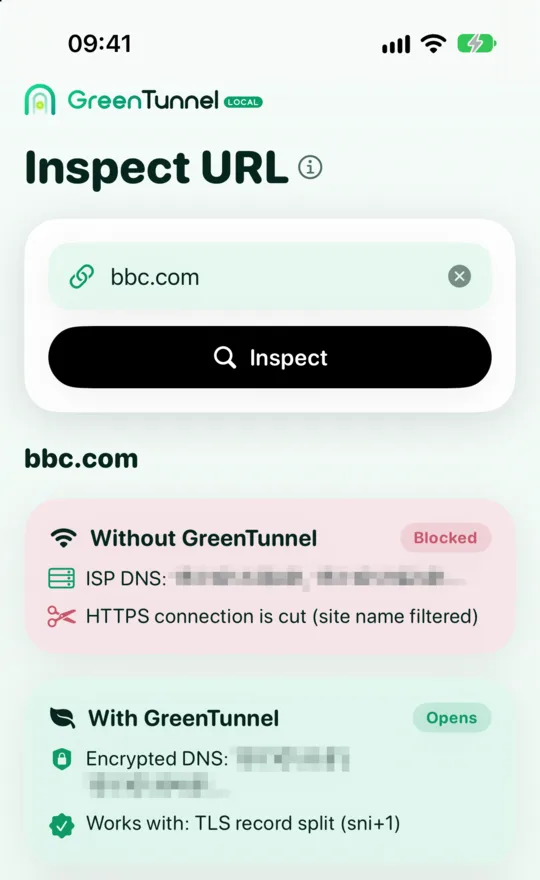
Open the Inspect URL tab, type the site, for example example.com, and tap Inspect. It can take up to a minute, because the engine tries several ways to connect. Every line of the result is explained in is a site blocked on your network. Here we focus on the summary card at the bottom.

Step 2: follow the verdict
"This site works without help"
Your network doesn't block this site. If your browser still fails, the cause is usually on your device. Go through Step 4 below. The site may also be down for maintenance, so try again in a few minutes.
"Your network fakes DNS answers for this site"
GreenTunnel's encrypted DNS fixes this kind of block, and it's always on while the VPN runs. If the site still won't open, your device's lookups may not be going through GreenTunnel. The usual suspects are Android's Private DNS or a browser's own DNS setting. The browser may also remember the old fake address. Close the browser completely and open it again.
"Your network reads the site name and blocks it"
That's an SNI filter. If Inspect URL found a technique that works and it differs from the one you use, tap Use this technique. It is saved and applied to the running connection right away. Then check two more settings from Step 3: the unblocking mode and Block QUIC.
"This site is blocked by IP address"
Your ISP blocks the server's address outright, so no local technique can help. Traffic now has to go through another server: Proxy Route or Tunnel Link with a server you choose and trust. Use routing rules so only that site goes through it and everything else stays direct.
"Couldn't determine the cause"
Try again on another network, for example mobile data instead of Wi-Fi. Each network blocks in its own way. If the result is the same on several networks, send a bug report as described at the end of this post.
Step 3: check GreenTunnel's settings
"Listed sites only" mode
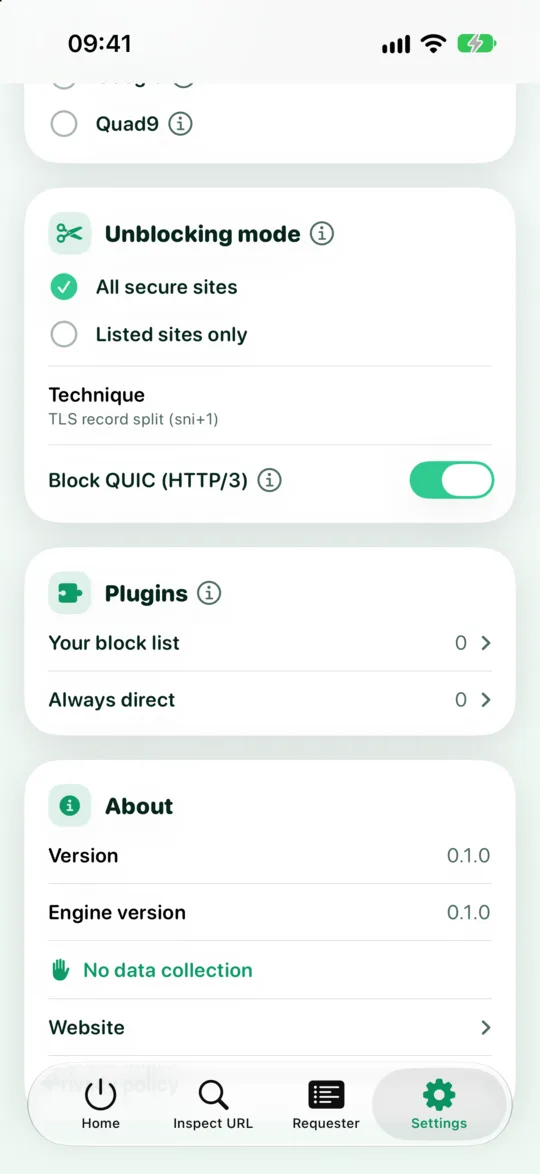
In this mode, GreenTunnel only splits packets for sites in your Sites to unblock list. Anything else goes direct and still gets filtered. Add the site to the list, or switch to All secure sites under Settings → Unblocking mode. In Requester you can also turn on Always bypass this domain for a specific connection.
Block QUIC (HTTP/3)
QUIC runs over UDP, so there is no first TCP packet to split. If you turned Block QUIC off, the browser may use HTTP/3 and get filtered. Turn it back on so the browser falls back to HTTPS over TCP, where bypassing works. See our post on QUIC.
The "Always direct" list
Sites in this list are never split or blocked. The list also matches subdomains, so if you once added a parent domain, every site under it goes direct too. Remove the site from the list if it needs bypassing.
A Proxy Route or rule is active
While a proxy profile is selected, connections go through the proxy. SOCKS5, HTTP and HTTPS profiles still split packets on the way to the proxy while their DPI bypass switch is on. Shadowsocks and WireGuard connections are not split. If the proxy fails, connections fail instead of quietly going direct. See no leaks when a proxy fails. If the proxy can't carry UDP, GreenTunnel blocks all UDP except DNS so apps use TCP through the proxy. Tap Test on the profile to see whether the proxy is alive, or pick Direct in the Advanced card to compare.
Step 4: check your device and network
Private DNS on Android
If Private DNS in Android's network settings is set to a specific provider hostname, Android sends lookups straight to that provider instead of through GreenTunnel's encrypted DNS. If that provider is blocked or slow, every site can fail, and your block list may miss domains. Set Private DNS to Off or Automatic while you use GreenTunnel.
Secure DNS in the browser
Chrome, Edge and Firefox have their own secure DNS option. If the provider the browser picked is blocked on your network, sites won't resolve. Choose the option that uses your current (system) provider so lookups go through GreenTunnel.
Another VPN or ad blocker
Android and iOS only allow one VPN at a time. Many ad blockers, firewalls and "network booster" apps also use the VPN slot. When one of them starts, GreenTunnel is disconnected. Check your system's VPN settings, including another app's always-on VPN option.
Wi-Fi with a login page
Hotel, café and airport Wi-Fi often makes you sign in on a special page. That page may not appear while a VPN is on. Turn GreenTunnel off, sign in to the Wi-Fi, then turn it back on. See also staying safe on public Wi-Fi.
Browser cache and certificate warnings
Your browser may remember a redirect to your ISP's warning page. Clear that site's data, or try a private window. If the browser shows a certificate error or "your connection is not private", don't click through. It could be a fake page, so run Inspect URL instead of forcing it open.
An app rather than a browser
Some apps use their own protocols or connect straight to IP addresses. Open Requester, filter by that app and look at its Error connections. The reason line tells you whether the connection was cut, timed out or couldn't reach the address.
When to report a bug
Send a report when:
- Inspect URL says the site opens with a technique, but your browser still fails after all the steps above.
- The app crashes, can't start the VPN, or keeps turning off. On Android, first read keeping the VPN running.
- A site fails only with GreenTunnel on and opens fine with it off.
Email cellhubsapp@gmail.com with your platform and version (under Settings → About), the network type (Wi-Fi or mobile, and the ISP name), a screenshot of the Inspect URL result and, if you can, the connection details from Requester. Never include passwords, WireGuard private keys or proxy account details.
FAQ
Do I need to turn GreenTunnel off to run Inspect URL?
Not necessarily. Inspect URL's checks don't go through GreenTunnel's own tunnel. But while the VPN is on, the "without GreenTunnel" DNS result may already have used encrypted DNS, and the app tells you when that happens. For an exact comparison, turn the VPN off and inspect again.
The site opens on Wi-Fi but not on mobile data. Why?
Each ISP blocks in its own way. Run Inspect URL on the network that fails and use the technique it suggests for that network.
Can changing the technique break other sites?
The default technique is very light and rarely causes trouble. Heavier ones can make a few sites flaky. If that happens, go to Settings → Technique and tap Reset to default.
My bank's site won't open with GreenTunnel on. What should I do?
Add your bank's domain to Always direct. That site will then never be split or sent through a proxy.